
Import Data into Xero from Excel
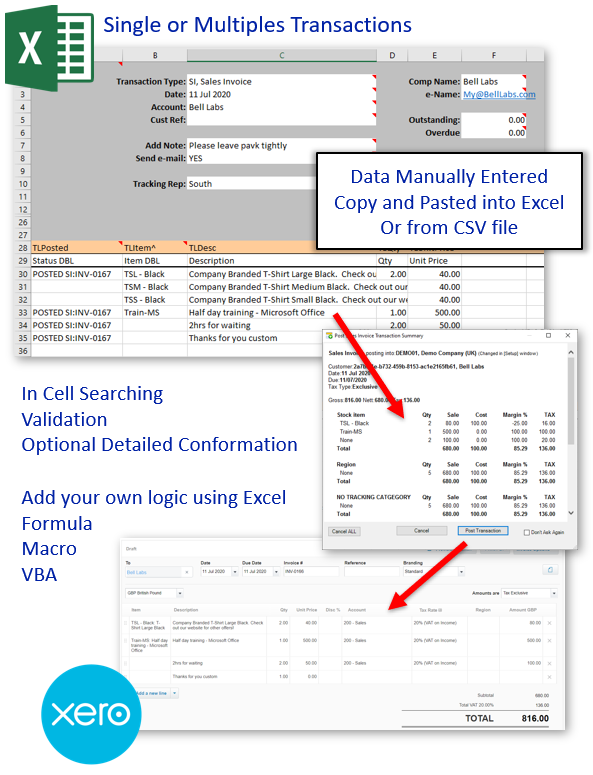
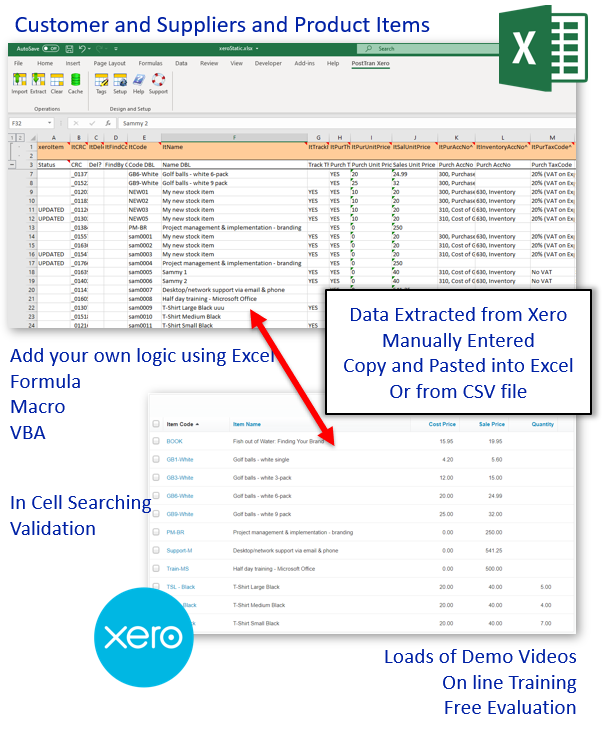
Use PostTrans to enable Microsoft Excel to Import Xero Transactions + Optionally Extract, Amend and Import Contacts, Items and Account records into Xero visually from within Excel into one or more Xero companies. The data can be brought in from manual input, ODBC connection, copy and paste or imported or uploaded from CSV file.
|
Download PostTrans for Xero and MS Excel for PC |
|
Consolidated Management Reports for Xero |
You also have the power of Microsoft Excel to manipulate the data by adding formula, macros or VBA to further enhance data manipulation before import to Xero, making PostTrans a very powerful solution.
-
-
Static Data Importation
-
Validation
PostTrans validates data for any errors visually highlighting any errors. This allows the user to correct the data, within Excel, before importing into Xero.
-
In-Cell Searching
Look up associated Xero values such as Products, Customers, Nominal Accounts codes with in cells for easy data entry.
-
Data Entry
Data entry can be manual entry, utilising In-Cell Searching, for quick Order entry. Or by file import and using Excel formula, macro or VBA code to manipulate or enhance data entry.
-
Full Evaluation
PostTrans can be easily evaluated with Xero Demonstration data for free. Download for Xero
-
Online Training
For Xero we have a series of comprehensive PostTrans Training Videos for Xero
-
Easy Licensing
Simple licensing, pay per month, per user. Basic and Pro version. Subscription can be cancelled in online account. Price for PostTrans for Xero Price.
-
Any other questions?
Contact us with question or to arrange a call.
If its that good, show me... Quick Order Pad
| 0:00 | Video Introduction | |
| 1:10 | Taking an order in 30 seconds | |
| 2:08 | Rewind for a slower explanation of process | |
| 4:00 | Adding another product to Order Pad | |
| 6:50 | Posting the Sales Order into Sage 50 | |
| 8:00 | How to find more information and Training |
Customer Comments
Customer Comments
Our customers say great things about PostTrans
Customised Order Entry - We have used PostTrans as our primary data-entry system for over 5 years. It is reliable and fast; allowing our team to process orders through our own customised Excel interface straight into Sage, I developed with additional functionality not available within our core accounts system.
Alex - Krome Ltd
Price Updates - We use PostTrans to update our price matrix in Excel. We simply extract the existing customer special price data, amend using excel formula, and post back into our Sage system, saving many hours, and reducing mistakes.
Toni - Tri Star Packaging
Sales Order Pad with Back to Back Purchase Order - We have a whole order entry system written using the power of Excel and PostTrans. We simple pop the customer details in an order pad, then take credit card payment, and then press a button to import a sales order for our services, followed by a purchase order to a specific supplier, very quickly.
Ben - AMA Waste Management
Monthly Payments - We use PostTrans to post our monthly Pension Payments, to those on our Pension scheme. It makes life so easy, simply managing all payments in one spread sheet, then every month simply posting the payments into our accounts system for processing, as purchase invoices against suppliers.
Laurence - Caterpillar Pensions
Management of Bill Of Materials - We use PostTrans to manage our complex bill of materials in Excel and push changes to Sage. Being able to extract, amend and then re-import into our accounts system, saves us load of time.
John - PHL Manufacturing
Initial System Setup - PostTrans was invaluable when first setting up our accounts system. It was far easier to use than traditional CSV importers, as it warns of any data which is being truncated, and removes hidden characters, and highlights errors as it imports. They can quickly be edit and the process can carry on from where it left off… Top Marks…
Tim - Salvesens
About Xero and PostTrans
Xero is cloud accounting software designed to help small businesses manage everyday financial tasks, including invoicing, purchases, payments, bank transactions and business reporting.
PostTrans for Xero connects Microsoft Excel with Xero so accounting data can be prepared, checked and imported using familiar spreadsheets. It is particularly useful when entering many records, updating existing data or transforming information received from another business system.
Import Xero data from Microsoft Excel
PostTrans supports Xero transaction imports, including sales invoices, credit notes, purchase invoices and orders. It can also help with sales receipts and payment allocation and manual journals.
For master records, PostTrans can import and update Xero contacts, accounts and product items. Data may be entered directly in Excel, copied and pasted, loaded from CSV files, or prepared with Excel formulas, macros and VBA.
Validate data before it reaches Xero
PostTrans validates spreadsheet data during processing and highlights errors so they can be corrected in Excel before import. Reusable templates, in-cell searching and visual confirmation help reduce repetitive entry while giving the user control over the information being submitted.
Explore the Xero training videos, review frequently asked questions, or download PostTrans for Xero to evaluate it with Xero demonstration data. You can also visit the official Xero website for information about Xero accounting software.