
Sage 200 : Import Nominal Record
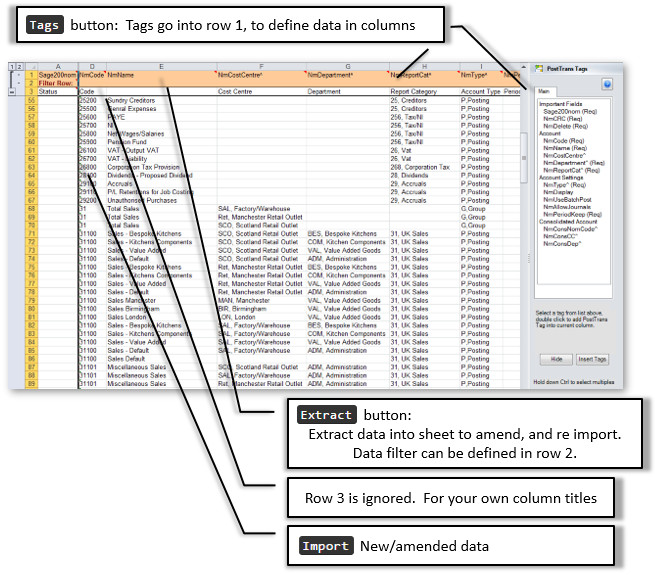
To extract Nominal data simply press Extract button, on the PostTrans Toolbar, this will allow you to extract Nominal data from Sage 200. You can also add filtering criteria in row 2.
Amending Nominal Data
Having extracted data, the user can now simply edit the Sage Nominal data in Microsoft Excel, before re-importing it back to Sage 200. Only changed records will be updated in Sage.
Importing Nominal Data
Simply add new lines to the spreadsheet from row 4 on-wards. Then press Import button, on the PostTrans Toolbar, to import new Sage Nominal records.
Filter
The customer data can be extracted, using the Extract button, and optionally filtered. see How to filter Sage 200 extracted data.
In Cell Search
The user can search for associated codes by entering the start of the code. Or any part of name, see Code Search for more information.
Demonstration Video
The video shows how to easily Extract, Amend, and import Sage line 50 Nominal data
Download Nominal Record Extract/Import Template
To use the template, with Sage 200, install PostTrans. Download
Trial with Sage demo company. Purchase a month subscription for Live Sage Company. Price
Watch the On-line Training course on how to use and customise the templates.
Nominal Extract/Amend/Import Template
This PostTrans function allows the user to easily extract, amend, and import Sage 200 Nominal data.
The cell A1 has a tag “Sage200nom” to designate the type of import. It uses a series of tags, placed in row 1, to identify the data to be processed.
These tags, listed in table below, can be easily added to a spreadsheet using the Tags button. See Training for an explanation of this.
Nominal Required fields
To Import/Extract/Amend Exchequer Enterprise Nominal Data, the following Tags/Fields must be specified:
Sage200nom, NoErrorDesc, NoCode, NoName
Cell A1 must equal Sage200nom
NoCode is used to detect end of spreadsheet. PostTrans will stop Importing/Amending, from row 4 on-wards, when this field is empty.
Restrictions
You can edit Nominal Records, such as the bedget figures, but not add new ones.
Tags for Nominal Records
The following PostTrans tags can be used to extract/import Nominal Records into Sage 200 .
See Online Training for Static templates for a full explanation of tags, and how PostTrans reads them to define the Extract/Import template.
|
Tag Name |
Data Type |
Description |
|
Important Fields: |
||
|
Sage200nom |
Text Req |
Returns `POSTED` if Trans line has been posted and will be ignored if `POSTED` (required). Also reports errors/warnings in data row |
|
NmCRC |
Text Req |
Contains CRC number to help PostTrans detect changes in current row. |
|
NmDelete |
Text 1 Req |
Delete record if "X" |
|
Account: |
||
|
NmCode |
Text 8 EOF Req |
Code |
|
NmName |
Text 60 Req |
Name |
|
NmCostCentre^ |
Text 3 |
Cost Centre |
|
NmDepartment^ |
Text 3 Req |
Department |
|
NmType^ |
Text 1 Req |
Account Type |
|
NmReportCat^ |
Text 4 Req |
Report Category |
|
Account Settings: |
||
|
NmDisplay |
Yes/NoTF |
Show Bal in Selection |
|
NmUseBatchPost |
Yes/NoTF |
Batch Totals Only |
|
NmAllowJournals |
Yes/NoTF |
Journals Allowed |
|
NmPeriodKeep |
Integer Req |
Periods To Keep |
|
Consolidated Account: |
||
|
NmConsNomCode^ |
Text 15 XML |
Cons Nominal Code |
|
NmConsCC^ |
Text 3 |
Cons Cost Centre |
|
NmConsDep^ |
Text 3 |
Cons Department |
|
Analysis Codes: |
||
|
NmAnal1^ |
Text 60 XML |
Analyisis code 1 - Setup View >> Analaysis code menu option will list mapping numbers and values |
|
NmAnal2^ |
Text 60 XML |
Analyisis code 2 - Setup View >> Analaysis code menu option will list mapping numbers and values |
|
NmAnal3^ |
Text 60 XML |
Analyisis code 3 - Setup View >> Analaysis code menu option will list mapping numbers and values |
|
NmAnal4^ |
Text 60 XML |
Analyisis code 4 - Setup View >> Analaysis code menu option will list mapping numbers and values |
|
NmAnal5^ |
Text 60 XML |
Analyisis code 5 - Setup View >> Analaysis code menu option will list mapping numbers and values |
|
NmAnal6^ |
Text 60 XML |
Analyisis code 6 - Setup View >> Analaysis code menu option will list mapping numbers and values |
|
NmAnal7^ |
Text 60 XML |
Analyisis code 7 - Setup View >> Analaysis code menu option will list mapping numbers and values |
|
NmAnal8^ |
Text 60 XML |
Analyisis code 8 - Setup View >> Analaysis code menu option will list mapping numbers and values |
|
NmAnal9^ |
Text 60 XML |
Analyisis code 9 - Setup View >> Analaysis code menu option will list mapping numbers and values |
|
NmAnal10^ |
Text 60 XML |
Analyisis code 10 - Setup View >> Analaysis code menu option will list mapping numbers and values |
|
NmAnal11^ |
Text 60 XML |
Analyisis code 11 - Setup View >> Analaysis code menu option will list mapping numbers and values |
|
NmAnal12^ |
Text 60 XML |
Analyisis code 12 - Setup View >> Analaysis code menu option will list mapping numbers and values |
|
NmAnal13^ |
Text 60 XML |
Analyisis code 13 - Setup View >> Analaysis code menu option will list mapping numbers and values |
|
NmAnal14^ |
Text 60 XML |
Analyisis code 14 - Setup View >> Analaysis code menu option will list mapping numbers and values |
|
NmAnal15^ |
Text 60 XML |
Analyisis code 15 - Setup View >> Analaysis code menu option will list mapping numbers and values |
|
NmAnal16^ |
Text 60 XML |
Analyisis code 16 - Setup View >> Analaysis code menu option will list mapping numbers and values |
|
NmAnal17^ |
Text 60 XML |
Analyisis code 17 - Setup View >> Analaysis code menu option will list mapping numbers and values |
|
NmAnal18^ |
Text 60 XML |
Analyisis code 18 - Setup View >> Analaysis code menu option will list mapping numbers and values |
|
NmAnal19^ |
Text 60 XML |
Analyisis code 19 - Setup View >> Analaysis code menu option will list mapping numbers and values |
|
NmAnal20^ |
Text 60 XML |
Analyisis code 20 - Setup View >> Analaysis code menu option will list mapping numbers and values |
|
ObjectStore Mappings: |
||
|
NmUser1 |
Text 30 |
10 user defined fields which can be mapped to Sage ObjectStore Builder customisations |
|
NmUser2 |
Text 30 |
User2 |
|
NmUser3 |
Text 30 |
User3 |
|
NmUser4 |
Text 30 |
User4 |
|
NmUser5 |
Text 30 |
User5 |
|
NmUser6 |
Text 30 |
User6 |
|
NmUser7 |
Text 30 |
User7 |
|
NmUser8 |
Text 30 |
User8 |
|
NmUser9 |
Text 30 |
User9 |
|
NmUser10 |
Text 30 |
User10 |
Req = Field is required EOF = End of file, Stop when no more values
XML = Un-attended PostTrans XML API for Sage 200
With data type Yes/No fields, if cell starts with 'y' or 'Y' is taken as TRUE
Where ^ denotes a In Cell Code Search, delete ^ at end of tag, to turn off code search
All Text fields are trimmed (spaces before) by default. Add ' to the end of the tag name to stop this.