
Sage 50:Extract/Amend/Import Customers
PostTrans imports Customers, which could be manually entered with the assistance of in-cell searching, using copy and paste, imported from CSV file or extracted from Sage 50 using the Extract button.
- Customer Import Example
- Demo Videos
- Template Structure in detail
- Common Features
- Template Tags
- Related Example Templates included with PostTrans
Related Pages
- Customer Price List
- Sales Order/Invoice
- Import Sage 50 Sales Receipts
- Sync Customers to Multiple Companies
Import Customer Features in Sage 50
Simply add new lines to the spreadsheet from row 30 on-wards. Then press Import button, on the PostTrans Toolbar, to import single or multiple Customers (Examples shown below).
Advantages
- Highlighted Validation of codes and data
- Search for Account, Stock, Project, Nominal, using our In-Cell Searching
- Add formula, vba or macros to manipulate the imported data
- Press Extract to populate the sheet with existing data, amend and Import
- Easy importation from CSV file
Examples of importing Sage 50 Customers
Customer template for importing into Sage 50
Demonstration Video
| 0:00 | Video Introduction | |
| 1:10 | PostTrans Template Introduction | |
| 3:44 | Extract Sage Line 50 Customers | |
| 6:30 | Add New Sage Customers | |
| 6:42 | Add additional fields to allow Price list and Nominal edit | |
| 10:12 | Filter Extracted Sage Line 50 Customer Data | |
| 12:00 | How to find more Information and Training |
Download Customer Extract/Import Template
To use the template, with Sage 50, install PostTrans. Download
Trial with Sage demo company. Purchase a month subscription for Live Sage Company. Price
Watch the On-line Training course on how to use and customise the templates.
Template Structure for Static Data
The template must have tag ‘Sage50cust’ in cell A1 to instruct PostTrans that we are interested in Sage 50 Customers, and that the sheet is a PostTrans Template. Pressing Import or Extract on a blank sheet will either open an existing example or create basic template for you to customise.
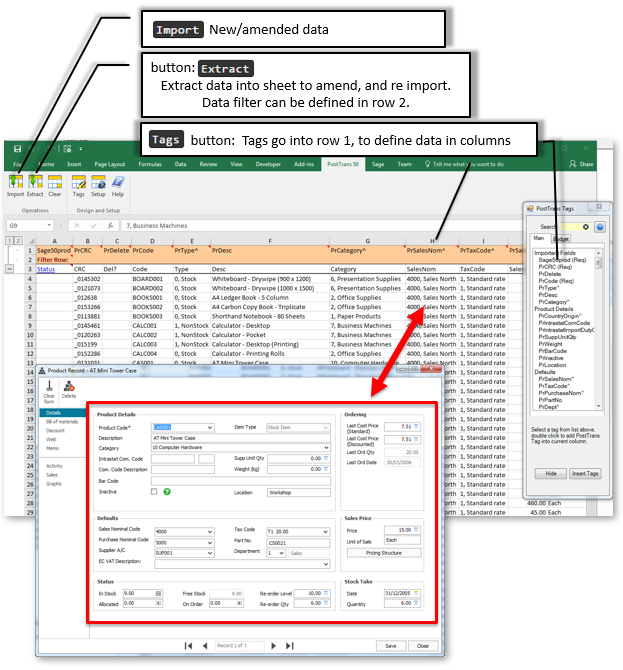
Row 1 contains a series of tags, which denote to PostTrans the data to be read/written in each column. These tags, and data columns can be rearranged to suit your needs, and the tags are added using the Tags button. See on-line Training Deleting the Tag name, in the cell, from this row removes the Sage 50 mapping. Table of Customers Tags
Hovering over these tags, in row 1, will show a comment which explains the tags purpose, data type and any other useful details.
Common Features
In-Cell Searching
Any Tag ending with ^ with have a in-cell search facility to look up associated values. Use SPACE + TAB to see all values, or SPACE and TEXT to perform a text search on description. These are returned to the cell as "CODE, DESCRIPTION". PostTrans only uses the CODE and ignores the comma and anything after it, thus data from a field would only need the CODE part of the data if from an external imported file.
In-cell Searching can be turned off by removing the ^ from the end of the tag name, or name in first line of comment (Header cells) to disable in-cell searching for a single column, or header cell. All in-cell searching can be turned off in Setup. In-cell searching.
Extracting the Data
The data extracted using the Extract button can be filtered, by entering criteria in row 2. Hover over cell A2 for instructions. Extracting Data
Amending Customers Data
Having extracted data, the user can now simply edit the Customers in Microsoft Excel, before re-importing it back into Sage 50.
PostTrans uses the tagged column CuCRC to detect changes in rows. Therefore, only records/rows which have changed since extraction are updated. If you add or delete a tagged column, PostTrans will treat ALL rows as having changed, and thus ALL records will be updated on next Import.
Importing the Data
Simply press the Import button to validate and import the data into Sage 50. PostTrans will read the Header cells and then process the rows of data until CuCode column contains no data. The Sage Company imported into can be set in the Setup window.
PostTrans ONLY edits those fields listed on the sheet when importing, thus any existing values, on a record, are unaffected. New records may have default values for certain fields.
File Import Button
This can be enabled in Setup to easily import cvs, or fixed length files, into sheet for importation. Formula can also be added, or macros/VBA to manipulate this data before importation. Import from CSV file.
Validation
Any values and associated codes will be invalid during import. The cursor will be moved to highlight any problems in data.
Evaluation and License
This functionality will work with Sage Demo data without a license. A license is required to import into any other Sage Company. Pricing
What else can I do?
Other Sage 50 Extract/Import types
Frequently Asked Questions?
Got another question? It may well be covered on our Frequently Asked Questions page.
Other Useful Topics
Clear Transaction and copy down formula
PostTrans Tags which map to Sage 50
Not all these tags/columns are needed. The table below lists the required and recommended:
|
Tag Name |
Data Type |
Description |
|
Important Fields: |
||
|
Sage50cust |
Text Req |
Returns `POSTED` if Trans line has been posted and will be ignored if `POSTED` (required). Also reports errors/warnings in data row |
|
CuCRC |
Text Req |
Contains CRC number to help PostTrans detect changes in current row. |
|
CuDelete |
Text 1 |
Delete record if "X" |
|
CuSearch^ |
Text 8 |
Search for record by entering code or pasting list, at top of column, and pressing Extract button |
|
CuCode |
Text 8 EOF Req XML |
Account Reference |
|
Account Details: |
||
|
CuName |
Text 60 XML |
Account Name |
|
CuBalance |
Currency Read |
Balance |
|
CuInactive |
Yes/No- XML |
Inactive Flag - yes/No |
|
Registered Address: |
||
|
CuAdd1 |
Text 60 XML |
Account Address Line 1 |
|
CuAdd2 |
Text 60 XML |
Account Address Line 2 |
|
CuAdd3 |
Text 60 XML |
Account Address Line 3 |
|
CuAdd4 |
Text 60 XML |
Account Address Line 4 |
|
CuPostcode^ |
Text 60 XML |
Account Postcode. If Postcode Search is enabled in ‘Setup >> Lookup >> Address Lookup’ then enter Space,Space + Postcode to search for an address. |
|
CuCountryCode^ |
Text 2 XML |
Country Code. |
|
CuVATRegNo |
Text 20 XML |
VAT Registration Number |
|
Contact Information: |
||
|
CuContactName |
Text 30 XML |
Contact Name |
|
CuTradeContact |
Text 30 XML |
Name of Trade Contact |
|
CuPhone |
Text 30 XML |
Telephone Number |
|
CuPhone2 |
Text 30 XML |
Second Telephone Number |
|
CuFax |
Text 30 XML |
Fax Number |
|
CuWWW |
Text 255 XML |
WWW Address |
|
e-mail Settings: |
||
|
Cue-mail1 |
Text 255 XML |
EMail Address |
|
Cue-mail2 |
Text 255 XML |
EMail Address 2 |
|
Cue-mail3 |
Text 255 XML |
EMail Address 3 |
|
Cue-mail4 |
Text 255 XML |
e-mail4 |
|
Cue-mail5 |
Text 255 XML |
e-mail5 |
|
Cue-mail6 |
Text 255 XML |
e-mail6 |
|
CuSendInvEmail |
Yes/No- XML |
Send Invoices To This Account via Email |
|
CuSendLettersEmail |
Yes/No- XML |
Send Letters To This Account via Email |
|
Defaults - Custom Fields: |
||
|
CuAnal1 |
Text 30 XML |
Analysis 1 |
|
CuAnal2 |
Text 30 XML |
Analysis 2 |
|
CuAnal3 |
Text 30 XML |
Analysis 3 |
|
CuAnal4 |
Text 30 XML |
Anal4 |
|
CuAnal5 |
Text 30 XML |
Anal5 |
|
CuAnal6 |
Text 30 XML |
Anal6 |
|
Defaults - Pricing and Discounting: |
||
|
CuDiscRate |
Double XML |
Discount Rate % |
|
CuDiscType^ |
Integer XML |
Discount Type |
|
CuPriceList^ |
Text 8 XML |
Price List Reference |
|
Defaults - Misc Defaults: |
||
|
CuNomCode^ |
Text 8 XML |
Default Nominal Code |
|
CuOverideProductNom |
Yes/No- XML |
Override Product Nominal Code in Invoicing |
|
CuTaxCode^ |
Integer XML |
Default Tax Code |
|
CuOverideProductTax |
Yes/No- XML |
Override the products own Tax Code. |
|
CuCurrency^ |
Integer XML |
Currency |
|
CuDepartment^ |
Text 2 XML |
Department Number |
|
Credit Control - Terms: |
||
|
CuCreditLimit |
Currency XML |
Credit Limit |
|
CuSettDays |
Integer XML |
Settlement Due Days |
|
CuSettDiscount |
Double XML |
Settlement Discount Rate |
|
CuPaymentDueDays |
Integer XML |
Payment Due Days |
|
CuAvgPayDays |
Integer XML |
Average Time To Pay |
|
CuTermsTxt |
Text 30 XML |
Terms |
|
CuCreditRef |
Text 60 XML |
Credit Bureau Reference |
|
CuBureau^ |
Integer XML |
Credit Bureau Used |
|
CuPriorityCust |
Yes/No- XML |
Priority Customer |
|
CuCreditPosition^ |
Integer XML |
Credit Position |
|
CuStatus^ |
Integer XML |
Account Status |
|
Credit Control - Restrictions: |
||
|
CuApplyCharges |
Yes/No- XML |
Can Charge Credit |
|
CuTermsAgreed |
Yes/No- XML |
Terms Agreed Flag |
|
CuHoldMail |
Yes/No- XML |
Restrict Mail |
|
CuOnHold |
Yes/No- XML |
Account On Hold |
|
Credit Control - Credit Review: |
||
|
cuDateOpened |
Date XML |
Date Account Opened |
|
CuLastCreditReview |
Date XML |
Date Last Credit Review |
|
CuNextCreditReview |
Date XML |
Date Next Credit Review |
|
CuApplicationDate |
Date XML |
Date Credit Applied For |
|
CuCreditAppRecived |
Date XML |
Date Credit Application Recieved |
|
CuMemo |
Memo XML |
Customer Notes |
|
Sales: |
||
|
CuFirstINV |
Date Read XML |
First Invoice Date |
|
CuLastInvDate |
Date Read XML |
Last Invoice Date |
|
CuLastReceipt |
Date Read XML |
Last Payment Date |
|
CuYTD |
Currency Read XML |
Turnover Year Date |
|
CuLYTD |
Currency Read XML |
Prior YTD |
|
Bank: |
||
|
CuBankName |
Text 60 XML |
Bank Name |
|
CuBankAdd1 |
Text 60 XML |
Bank Address Line 1 |
|
CuBankAdd2 |
Text 60 XML |
Bank Address Line 2 |
|
CuBankAdd3 |
Text 60 XML |
Bank Address Line 3 |
|
CuBankAdd4 |
Text 60 XML |
Bank Address Line 4 |
|
CuBankPostcode^ |
Text 60 XML |
Bank Address Postcode. If Postcode Search is enabled in ‘Setup >> Lookup >> Address Lookup’ then enter Space,Space + Postcode to search for an address. |
|
CuBankAccName |
Text 60 XML |
Bank Account Name |
|
CuBankSort |
Text 10 XML |
Bank Sort Code |
|
CuBankNumber |
Text 60 XML |
Bank Account Number |
|
Payment Details.: |
||
|
CuBacRef |
Text 60 XML |
Reference for BACS Transfer |
|
CuBankIBAN |
Text 60 XML |
Bank IBAN Number |
|
CuBankSwift |
Text 60 XML |
Bank BIC/Swift |
|
CuBankRollNo |
Text 60 XML |
Bank Roll Number |
|
CuBankAddRef1 |
Text 60 XML |
Bank Additional Ref 1 |
|
CuBankAddRef2 |
Text 60 XML |
Bank Additional Ref 2 |
|
CuBankAddRef3 |
Text 60 XML |
Bank Additional Ref 3 |
|
CuPaymentMethod^ |
Text 2 XML |
Payment Type. If BACS then sets CuOnlineReceipts=YES, other wise need to set manually |
|
CuOnlineReceipts |
Yes/No- XML |
BACS Online Receipts Flag. If CuPaymentMethod=BACS set other wise needs setting manuyally |
|
Payment Details: |
||
|
CuManager |
Text 60 XML |
Name of Account Manager |
|
CuCompReg |
Text 16 XML |
CompReg |
|
CuEORIno |
Text 16 |
EORI no |
|
CuType^ |
Integer XML |
Account Type |
|
Building Society: |
||
|
CuBankBuildSocRef |
Text 60 XML |
Reference for Building Society Transfer |
|
CuBankUseBuildingSoc |
Yes/No- XML |
Account uses Building Society |
|
Credit Card: |
||
|
CuCreditAppRecieved |
Yes/No- XML |
True if Credit Application Received |
|
CuCCNumber |
Text 30 XML |
Credit Card Number |
|
Charity Donor: |
||
|
CuDonTitle |
Text 4 XML |
Charity Donor Title |
|
CuDonForname |
Text 35 XML |
Charity Donor Forename |
|
CuDonSurname |
Text 35 XML |
Charity Donor Surname |
|
CuDonFund^ |
Integer XML |
Charity Donation Fund Number |
|
CuDonGiftAid |
Yes/No- XML |
Charity Donor Gift Aid is enabled |
|
CuDonDecFrom |
Date XML |
Donor Declaration Valid From |
|
CuDonTyDonor |
Yes/No- XML |
Charity Donor Type Donor Flag |
|
CuDonTyMember |
Yes/No- XML |
Charity Donor Type Member Flag |
|
CuDonTyCust |
Yes/No- XML |
Charity Donor Type Customer Flag |
|
Charity Membership Details: |
||
|
CuDonMemberSince |
Date XML |
Member Since |
|
CuDonReminderDate |
Date XML |
Member Renewal Date |
|
CuDonReminderDays |
Integer XML |
Member Reminder Date (days) |
|
Other: |
||
|
CuSalesRep |
Text 60 XML |
Name of Sales Representative |
|
CuEcCode |
Text 3 Read XML |
EC Member Code |
|
CuDUNSno |
Text 9 XML |
DUNS Number |
Req = Field is required EOF = End of file, Stop when no more values
XML = Un-attended PostTrans XML API for Sage 200
With data type Yes/No fields, if cell starts with 'y' or 'Y' is taken as TRUE
Where ^ denotes a In Cell Code Search, delete ^ at end of tag, to turn off code search
All Text fields are trimmed (spaces before) by default. Add ' to the end of the tag name to stop this.
Related Example Sheets
You can easily access the example sheets by pressing Help button, on the PostTrans Toolbar to access these related examples, or downloading them from the links below.
To use the template, with Sage 50, install PostTrans. Download
Trial with Sage demo company. Purchase a month subscription for Live Sage Company. Price
Watch the On-line Training course on how to use and customise the templates.
| Download Sage50 A TestSheet.xlsx | ||
|
Test DB Sheet |
Sheet:'' |
|
|
*** Test Sage Connection Template *** |
Sheet:'Test Sheet' |
|
Static Data - Customer: |
||
| Download Sage50Cust.xlsx | ||
|
Customer Records |
Sheet:'Customer Rec' |
|
|
Customer Delivery Address Records |
Sheet:'CustDel' |
|
|
Customer Price Lists |
Sheet:'Customer Price List' |
|
|
Customer Price List/Qty Assignment |
Sheet:'Customer Price List Assignment' |
|
|
Product Customer Price Structure |
Sheet:'Customer Prices Structure' |
|
|
Product Customer Special Prices |
Sheet:'Special Prices' |
|