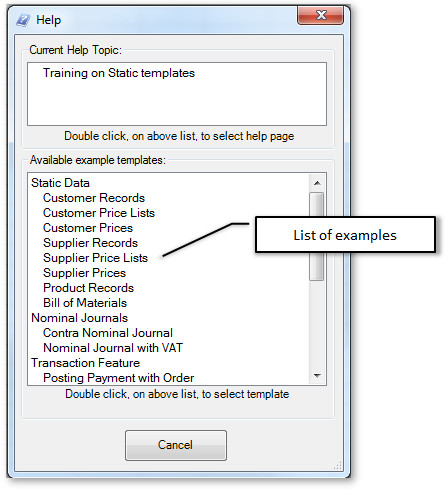
26 workbooks. Examples for everyday records and transactions.
01 EXCEL · XLSX
Connection test
Check the connection between Excel and Sage 50.
Download workbook ↓ Sage50 A TestSheet.xlsx Inside this workbook
02 EXCEL · XLSX
Customers & pricing
Maintain customer records, price lists and special prices.
Download workbook ↓ Sage50Cust.xlsx Inside this workbook
03 EXCEL · XLSX
Suppliers & pricing
Extract, amend and import suppliers and their prices.
Download workbook ↓ Sage50Supp.xlsx Inside this workbook
04 EXCEL · XLSX
Products & stock
Manage product records, budgets, bills of materials and stock adjustments.
Download workbook ↓ Sage50Prod.xlsx Inside this workbook
05 EXCEL · XLSX
Nominal journals
Prepare journals with one or two columns, contra entries and VAT.
Download workbook ↓ Sage50TransNom.xlsx Inside this workbook
06 EXCEL · XLSX
Sales order pad
Build an order pad for entering sales in Excel.
Download workbook ↓ Sage50OrderPad.xlsx Inside this workbook
07 EXCEL · XLSX
Sales transactions & design
Create sales transactions and customise how your templates work.
Download workbook ↓ Sage50trans.xlsx Inside this workbook
08 EXCEL · XLSX
Sales receipts
Import receipts and allocate them to outstanding invoices.
Download workbook ↓ Sage50SalesReceipts.xlsx Inside this workbook
09 EXCEL · XLSM
Expenses & mileage
Prepare expense and mileage claims in Excel.
Download workbook ↓ Sage50expense.xlsm Inside this workbook
10 EXCEL · XLSX
ExpenseIn imports
Bring expenses captured with ExpenseIn into Sage.
Download workbook ↓ Sage50ExpenseIn.xlsx Inside this workbook
11 EXCEL · XLSX
Remote purchase orders
Prepare purchase orders away from your accounts system.
Download workbook ↓ Sage50RemotePur.xlsx Inside this workbook
12 EXCEL · XLSX
Purchase transactions
Work with purchase orders, approvals, invoices and project costs.
Download workbook ↓ Sage50transPur.xlsx Inside this workbook
13 EXCEL · XLSM
Transactions from VBA
Run multiple transactions using a VBA button.
Download workbook ↓ Sage50transByCode.xlsm Inside this workbook
14 EXCEL · XLSX
Orders from a file
Import customers and multiple orders from CSV files.
Download workbook ↓ Sage50FileImport.xlsx Inside this workbook
- Import File:Customer and Multiple Orders from CSV Sheet: Order CSV Contains two sheets. The first imports three customers, and then an order for each customer. Demonstrates how to import files easily and importing multiple transactions in one sheet
- Import File:Multiple Orders from CSV with Currency Pro Sheet: Order CSV with Currency Pro Contains two sheets. The first imports three customers, and then an order for each customer in currencies. Demonstrates how to import files easily and importing multiple transactions in one sheet
- Import File:Simple Multiple Orders from CSV Sheet: Simple Orders from CSV Contains two sheets. The first imports three customers, and then an order for each customer in currencies. Demonstrates how to import files easily and importing multiple transactions in one sheet
15 EXCEL · XLSX
Direct debits & payments
Import payments, receipts and credits, including foreign currencies.
Download workbook ↓ Sage50FileImportPaymentDD.xlsx Inside this workbook
- Import File:Direct Debit payments SI+SR with Currency Sheet: Direct Debit SI Paymen Currency This imports Invoices SI with matching Recipts to Audit Trial with Currency
- SA with or without currency Sheet: SA This imports Invoices SA transactions, optionally with currency, to Audit Trial
- SR with or without currency Sheet: SR This imports Invoices SR transactions, optionally with currency, to Audit Trial
- SC Sales Credit with or without currency Sheet: SCAT This imports Invoices SC transactions, optionally with currency, to Audit Trial
- Import File:Direct Debit payments SI+SR Sheet: Direct Debit SI with Payment This imports Invoices SI with matching Recipts to Audit Trial
- PR with or without currency Sheet: PR This imports Invoices PR transactions, optionally with currency, to Audit Trial
- PA with or without currency Sheet: PA This imports Invoices PA transactions, optionally with currency, to Audit Trial
16 EXCEL · XLSX
Orders with payments
Import CSV orders with payments, rounding and extra lines.
Download workbook ↓ Sage50FileImportPayment.xlsx Inside this workbook
- Import File:Orders from CSV with Payment, Rounding and Extra Lines Sheet: Order and payment CSV This imports orders, and overcomes rounding issues with external system. It also shows how to add addition lines in each row.
17 EXCEL · XLSX
Cashbook
Prepare bank, credit card and cash transactions across companies.
Download workbook ↓ Sage50cashbook.xlsx Inside this workbook
- Cashbook Multi Company and Type Sheet: Cashbook Multi Company and Type This imports Invoices Cashbook Multi Company and Type
- BP Cashbook Bank Payment with or without currency Sheet: BP Bank Payment This imports Invoices BP transactions, optionally with currency, to Audit Trial
- BR Cashbook Bank Receipt with or without currency Sheet: BR Bank Receipt This imports Invoices BR transactions, optionally with currency, to Audit Trial
- VP Cashbook Visa Credit Payment with or without currency Sheet: VP Visa Payment This imports Invoices VP transactions, optionally with currency, to Audit Trial
- VR Cashbook Visa Credit Receipts with or without currency Sheet: VR Visa Credit This imports Invoices VR transactions, optionally with currency, to Audit Trial
- CP Cashbook Cash Payment with or without currency Sheet: CP Cash Payment This imports Invoices CP transactions, optionally with currency, to Audit Trial
- CR Cashbook Cash Receipt with or without currency Sheet: CR Cash Receipt This imports Invoices CR transactions, optionally with currency, to Audit Trial
18 EXCEL · XLSM
Batch invoices & email
Import multiple invoices or orders and print or email the results.
Download workbook ↓ Sage50_MultiAndEmail.xlsm Inside this workbook
- Import Multiple Invoices\Orders and e-mail/Print Sheet: Simple Orders email and Print Demos importing SI, Credits, Discount and Sales Orders. But after import e-mails the transaction or prints it
- Import Multiple Invoices\Orders NO Print or Price Lookup Sheet: Simple Orders No lookups Demos importing SI, Credits, Discount and Sales Orders. But after import e-mails the transaction or prints it
19 EXCEL · XLSX
Multiple companies
Post different transaction types to multiple companies.
Download workbook ↓ Sage50trans Multicompany.xlsx Inside this workbook
20 EXCEL · XLSX
Intercompany orders
Connect sales and purchase orders across two sheets.
Download workbook ↓ Sage50InterCompany2.xlsx Inside this workbook
- Transaction - Inter Company in 2 sheets using SO/PO Pro Sheet: Sales Post a Sales Order into one company and a matching Purchase Order in a second company
21 EXCEL · XLSX
Intercompany transactions
Prepare nominal and other intercompany transactions on one sheet.
Download workbook ↓ Sage50InterCompany1.xlsx Inside this workbook
- Transaction - Inter Company Nominal in 1 sheet Pro Sheet: NOM
- Transaction - Inter Company in 1 sheet Pro Sheet: All In One
22 EXCEL · XLSX
Intercompany invoices
Connect sales and purchase invoice transactions across two sheets.
Download workbook ↓ Sage50InterCompany3.xlsx Inside this workbook
- Transaction - Inter Company in 2 sheets using SI/PIA Pro Sheet: Sales Post a Sales Invoice into one company and a matching PIA (Purchase Invoice and Stock Adjust IN) in a second company
23 EXCEL · XLSX
Nominal codes & banks
Extract and maintain nominal codes and bank accounts.
Download workbook ↓ Sage50transNom.xlsx Inside this workbook
- Nominal Codes Sheet: Nominal Codes Add/update Nominal Codes
- Bank Accounts Sheet: Bank Accounts Add/update Bank Accounts
24 EXCEL · XLSX
Charity template
Explore the supplied charity workbook and its example sheet.
Download workbook ↓ Sage50Charity.xlsx Inside this workbook
- Shows Customer Price List on header Sheet: Invoice Importing an SI to Charitable Fund
25 EXCEL · XLSX
Projects
Create and maintain project records.
Download workbook ↓ Sage50proj.xlsx Inside this workbook
26 EXCEL · XLSX
Assets
Extract and maintain asset records.
Download workbook ↓ Sage50asset.xlsx Inside this workbook

 POSTTRANS FOR SAGE 50